


New to proxies? This beginner's guide explains what proxy servers do, how they route traffic, and when to use one instead of a VPN.
Most people first hear about proxy servers in scattered contexts, privacy tools, blocked websites, web scraping, workplace networks, and assume it’s some advanced, technical mechanism they’re supposed to already understand.
You’re not behind. The confusion comes from fragmented information. We’ll build this from the ground up.
Most explanations of proxy servers assume background knowledge that most beginners don’t actually have. They throw in networking terms, skip the mechanics, and jump straight to use cases like privacy or scraping. The result: people memorize the label but don’t understand the function. So let’s slow the system down and look at what a proxy actually does, what it does not do, and why it exists in the first place.
- What is a proxy server
- How the connection works with and without a proxy
- Proxy vs VPN
- Proxy strategic use case
A proxy is not a privacy spell. Not a hacker tool. Not automatically secure. It is an intermediary layer that changes how requests move between you and the internet. Everything else follows from that.
What Is a Proxy Server?
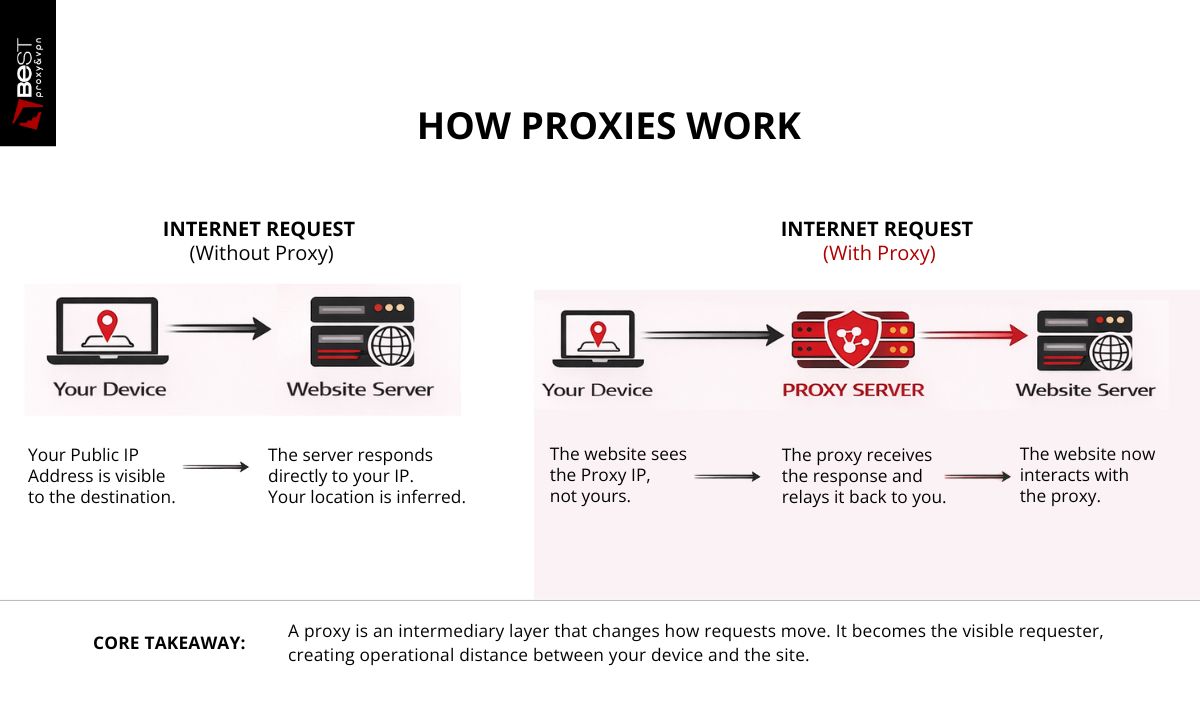
A proxy server is a computer system that sits between your device and the websites or online services you access. It receives your request, forwards it on your behalf, receives the response, and sends it back to you.
Instead of: Your device → Website
It becomes: Your device → Proxy → Website
The proxy becomes the visible requester. That single structural change creates multiple practical effects: identity masking, traffic filtering, geographic rerouting, and request distribution.
A proxy is best understood as a traffic representative. It speaks to servers, so you don’t speak to them directly.
How a Normal Internet Request Works (Without a Proxy)
Before adding a proxy, understand the baseline.
When you visit a website directly:
- Your browser sends a request to the site’s server
- Your public IP address is included
- The server responds to your IP
- Data returns straight to your device
This direct path means:
- Your IP is visible
- Your location can be inferred
- Rate limits and blocks apply directly to you
- Network policies must be enforced locally
There is no buffer layer.
How a Proxy Changes the Flow
With a proxy in place, the path changes:
- Your browser sends the request to the proxy
- The proxy evaluates and forwards it
- The destination server sees the proxy as the origin
- The response returns to the proxy
- The proxy relays it back to you
The website now interacts with the proxy, not your device. That shift creates separation between:
- requester identity
- requester location
- requester device
Not perfect separation, but operational distance.
Why People Use Proxies Today
Proxies were not originally built for anonymity. They were built for control and efficiency in networked systems. Privacy uses came later. Understanding the origin helps clarify their strengths and limits. A proxy is useful whenever a direct connection is not optimal, not allowed, or not desired. Proxies are used in different contexts, with the same underlying mechanism.
- Identity masking: A proxy can present its own IP address instead of yours. This reduces direct exposure to the destination server.
- Geographic rerouting: If a proxy is located in another country, the destination site treats the request as coming from that region. This affects localized content and access rules.
- Network governance. Organizations use proxies to:
- block categories of websites
- log outbound traffic
- enforce browsing policy
- reduce bandwidth waste
- Traffic distribution: Automation systems use proxies to spread requests across multiple IP addresses so activity does not appear concentrated from one source.
- Caching and performance: Some proxies store copies of frequently requested content and serve it locally, reducing load and improving response time.
The unifying theme is not secrecy, it is routing control.
Can a Proxy Hide Your IP Address?
From the destination server, yes.
From the proxy provider, no.
That distinction is non-negotiable.
When you use a proxy:
- The website sees the proxy’s IP
- The proxy sees your IP (unless additional layers are used)
So you are not disappearing. You are changing who sees you directly. If the proxy logs activity, your behavior may still be recorded there. This is why provider trust matters more than the tool label.
Do Proxies Make You Anonymous?
No, not by default. Anonymity depends on multiple independent factors:
- logging policies
- traffic encryption
- account logins
- browser fingerprinting
- cookies and trackers
- behavior patterns
A proxy only changes routing identity. It does not erase behavioral identity. People often overestimate tool scope and underestimate data correlation. Websites don’t rely on IP addresses alone to recognize patterns. A proxy is one layer in a larger privacy architecture, not the architecture itself.
Proxy vs VPN: The Distinction
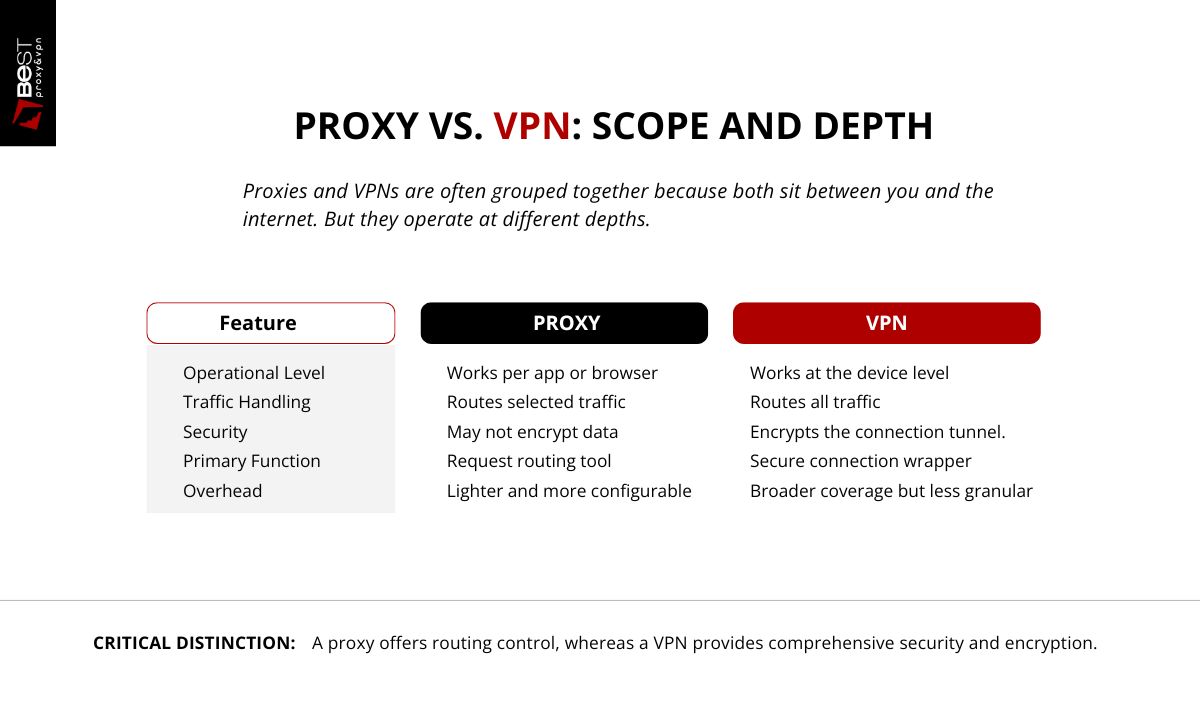
Proxies and VPNs are often grouped together because both sit between you and the internet. But they operate at different depths.
Proxy
- Usually works per app or browser
- Routes selected traffic
- May not encrypt data
- Lighter overhead
- More configurable per use case
VPN
- Works at device level
- Routes all traffic
- Encrypts the connection tunnel
- Broader privacy coverage
- Less granular control
If you think in layers:
Proxy = request routing tool.
VPN = secure connection wrapper.
They overlap in effect but differ in scope.
Do Proxies Slow Down Internet Speed?
They can, but not inherently. Performance depends on:
- server quality
- server load
- physical distance
- proxy type
- inspection and filtering rules
- network congestion
A well-provisioned proxy close to your region may add negligible delay. A free overloaded proxy across the world will be slow. Speed is not determined by the concept, it is determined by the infrastructure.
The Operational Tradeoff Most Beginners Miss
A proxy adds distance and control, and every layer of control introduces tradeoffs.
You gain:
- routing flexibility
- identity buffering
- policy enforcement options
You risk:
- provider visibility
- misconfiguration
- degraded speed
- false security assumptions
Tools do not create outcomes. Configuration and governance do.
When Should We Use a Proxy?
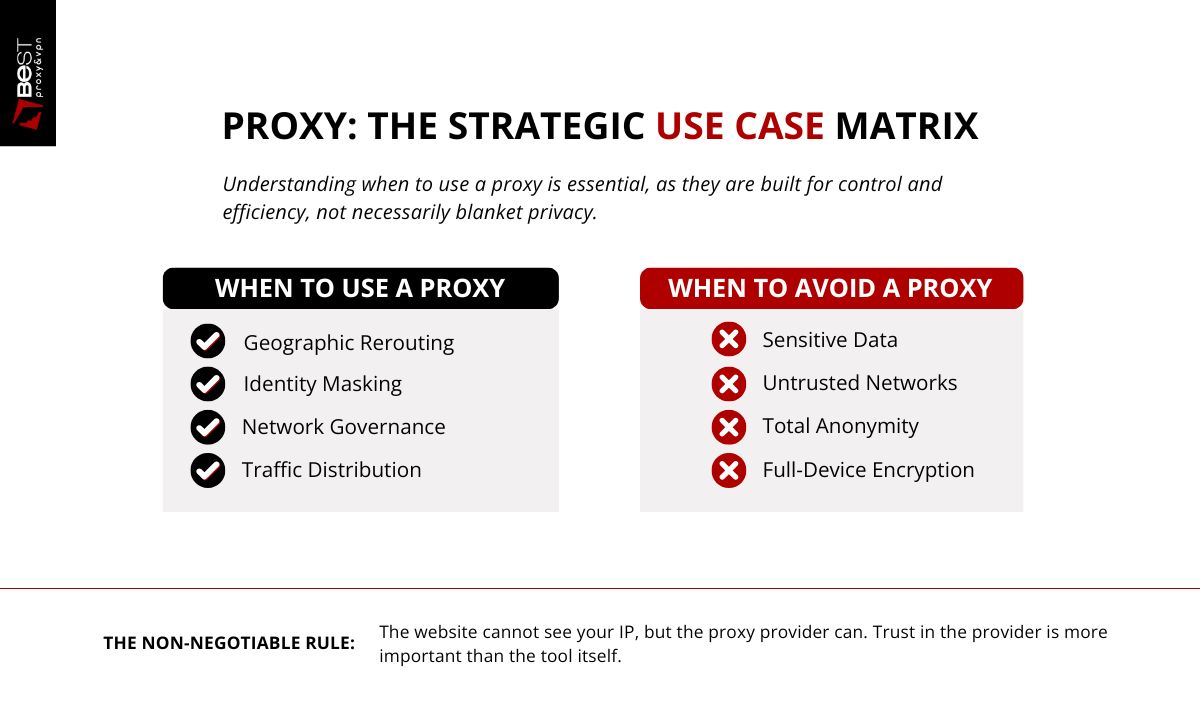
A beginner should use a proxy when the goal is routing control, not blanket privacy. That includes situations where you need to appear as if your request is coming from a different location, test how a website behaves from another region, distribute repeated requests across multiple IP addresses, or follow a network’s access rules at work or school. A proxy is also appropriate when you want lightweight IP masking for a specific app or browser session without changing your entire device connection.
The decision rule is simple: use a proxy when you need selective traffic redirection for a defined task, not as a general security solution.
When You Should NOT Use a Proxy
You should not use a proxy when your primary need is
- strong privacy,
- full-device encryption, or
- protection on untrusted networks.
Most basic proxies do not encrypt traffic and do not prevent tracking through cookies, logins, or browser fingerprinting. A proxy is also the wrong tool if you are handling sensitive data, or assuming it guarantees anonymity, it does not.
Free proxies are especially unsuitable for anything involving credentials or personal information because logging and interception risks are common. If the requirement is comprehensive security rather than request routing, a properly configured VPN or secure network setup is the correct instrument, not a proxy.
FAQ
What is a proxy server in simple terms?
A proxy server is a middle layer between your device and the internet that sends requests on your behalf and returns the response to you.
Does a proxy hide your IP address?
It hides your IP from the destination website but not from the proxy provider itself.
Is a proxy the same as a VPN?
No. A proxy routes selected traffic, while a VPN encrypts and routes all device traffic.
Are proxy servers safe to use?
Safety depends on the provider, logging practices, and configuration.
Do proxies make the internet slower?
They can add a delay depending on server quality and distance, but good proxies often have minimal impact.
The Key Beginner Mistake
Most beginners ask: “Are proxies good or bad?” That’s the wrong frame. A proxy is a tool that moves visibility and routing. Its value depends on:
- who runs it
- how it’s configured
- what you’re using it for
Understanding types is what turns a proxy from a blunt instrument into a precise one. In the next article, we break down the major proxy types, residential, datacenter, SOCKS5, rotating, and when each one actually makes sense to use.