


Web traffic on the internet does not always travel directly between a user and a website. In many network environments, requests pass through intermediary systems that manage, route, or control how those connections are handled. One of the most common intermediaries used for web communication is the HTTP proxy. This intermediary layer can serve multiple purposes, from managing access to websites in corporate networks to optimizing traffic through caching or distributing large volumes of web requests across different infrastructures.
At the same time, HTTP proxies are often confused with other proxy technologies, particularly SOCKS proxies, which operate at a different layer of the network and follow a different design philosophy. In this article, we’ll explain:
- What an HTTP proxy is
- How the HTTP proxy protocol works
- The difference between forward and reverse proxies
- How HTTP proxies compare with SOCKS proxies
- Common use cases and configuration methods
By the end, you’ll have a clear understanding of how HTTP proxy servers route and manage web traffic.
Key Points
- An HTTP proxy is an intermediary server that processes web requests between a client and a destination website.
- The HTTP proxy protocol allows the proxy to interpret and manage HTTP requests and responses.
- HTTP proxies can filter web traffic, cache content, modify request headers, and enforce access policies.
- Unlike SOCKS proxies, HTTP proxies are designed specifically to handle web traffic using the HTTP protocol.
- HTTP proxies can operate as forward proxies for clients or reverse proxies for web servers.
- Proxy infrastructure may use dedicated or shared IP addresses, depending on how the service is provisioned.
- HTTP proxies can run on residential or datacenter networks, which affects how web traffic appears to destination websites.
What Is an HTTP Proxy?
An HTTP proxy is an intermediary server that processes web requests between a client and a destination web server, operating specifically at the application layer of the network.
Instead of connecting directly to a website, the client sends its request to the HTTP proxy server, which then forwards the request to the destination server and returns the response to the client. This process allows the proxy to act as a gateway for web traffic. The destination website receives the request from the proxy rather than directly from the client device.
Since the proxy can read and interact with HTTP data, it can process web traffic instead of merely forwarding network packets, allowing it to:
- Inspect and modify request headers.
- Apply access and filtering rules.
- Cache responses to reduce repeated requests.
- Enforce authentication or usage policies.
- Log and analyze web traffic behavior.
This level of interaction is what distinguishes HTTP proxies from more general-purpose proxy protocols, as it also shapes how that traffic is interpreted. In practice, this makes HTTP proxies suitable for tasks where web traffic needs to be controlled, distributed, or made consistent across multiple requests.
How the HTTP Proxy Protocol Works
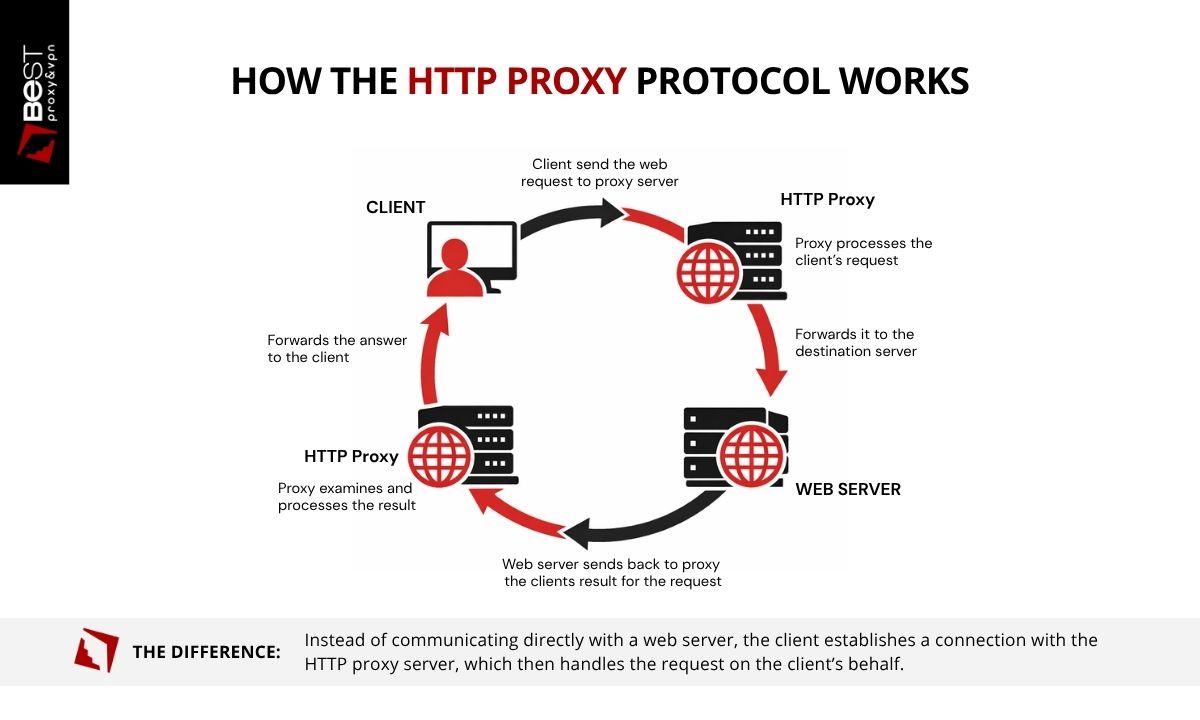
As we have seen so far, the HTTP proxy protocol defines how web requests are routed through an intermediary server before reaching their destination. This process is not just routing. Each step introduces an opportunity to inspect, modify, or control the request.
1. The Client Sends a Request to the Proxy
When a browser or application is configured to use an HTTP proxy, all HTTP requests are directed to the proxy server first. The request includes the destination URL, request method, headers, and any associated data.
At this stage, the client is no longer communicating directly with the destination server. The proxy becomes the first point of contact.
2. The Proxy Interprets the Request
Because the proxy understands HTTP, it can analyze the structure of the request before forwarding it. This is where control is applied. Depending on the configuration, the proxy may:
- Validate authentication credentials.
- Evaluate access or filtering rules.
- Modify headers or metadata.
- Enforce usage policies.
This step determines how the request will be presented to the destination server.
3. The Proxy Forwards the Request
After processing, the proxy establishes a connection with the destination server and sends the request. From the server’s perspective, the request originates from the proxy’s IP address. The original client's IP is not directly visible at the network level.
4. The Server Responds to the Proxy
The destination server processes the request and returns a response to the proxy. This includes status codes, headers, and content. At this point, the server has interacted only with the proxy, not the client.
5. The Proxy Processes and Returns the Response
The proxy receives the response and forwards it back to the client. Before returning the data, it may:
- Cache the response for future requests.
- Log request and response details.
- Apply additional filtering or transformations.
Each pass through the proxy introduces a layer where traffic can be controlled, observed, or modified. This is the main difference between HTTP proxies and simple traffic relays.
Forward Proxy vs Reverse Proxy
An HTTP proxy can operate in two different roles depending on where it is placed in the network: as a forward proxy or a reverse proxy. The difference is not in the protocol, but in which side of the connection the proxy represents.
Forward Proxy (Client-Side)
A forward proxy acts on behalf of the client. When a user or application sends a request through a forward HTTP proxy, the proxy server forwards the request to the destination website and returns the response to the client. In this setup, the proxy sits between the client and the internet. Websites receive requests from the proxy rather than directly from the client device.
Forward HTTP proxies are commonly used for:
- Routing user traffic through intermediary servers
- Managing access to websites in corporate networks
- Distributing web requests across multiple IP addresses
- Controlling or monitoring web activity
This is the type of proxy most people refer to when discussing HTTP proxy servers used by browsers or applications.
Reverse Proxy (Server-Side)
A reverse proxy acts on behalf of one or more servers. When a user sends a request to a website, the request is first received by the reverse proxy. The proxy then forwards the request to a backend server and returns the response to the client.
Reverse proxies are used to:
- Distribute traffic across multiple servers (load balancing)
- Improve performance through caching
- Protect backend servers from direct exposure
- Manage SSL termination and security controls
Many large websites and web platforms rely on reverse proxies to manage incoming traffic and maintain stable infrastructure. Both types of proxies use the HTTP proxy protocol, but they serve different architectural roles within a network.
HTTP Proxy vs SOCKS Proxy
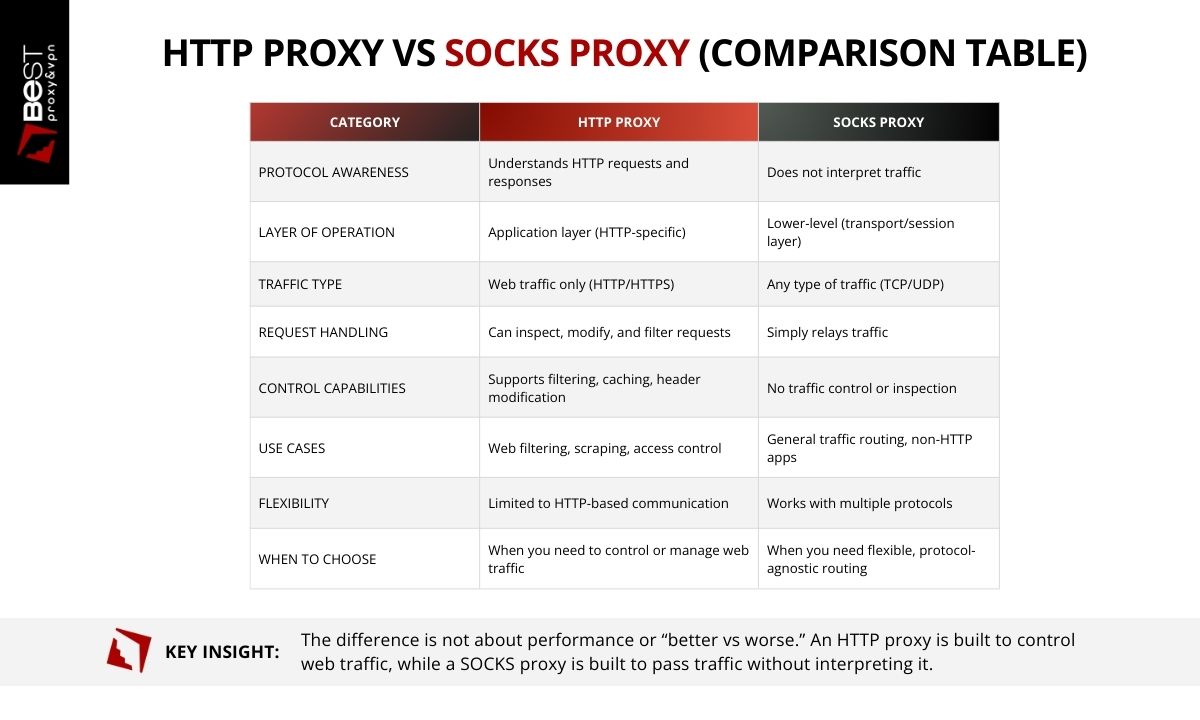
HTTP proxies and SOCKS proxies both route traffic through intermediary servers, but they operate at different layers of the network and serve different purposes. The distinction comes down to how much the proxy interacts with the traffic passing through it.
An HTTP proxy is designed specifically to handle web traffic using the HTTP protocol. Because it understands the structure of HTTP requests and responses, it can inspect and manage web communication. This allows HTTP proxy servers to filter websites, modify request headers, cache responses, and enforce access policies.
A SOCKS proxy, by contrast, operates at a lower networking layer and does not interpret the protocol being transmitted. Instead of analyzing the request, a SOCKS proxy simply establishes a connection and relays traffic between the client and the destination server.
This difference in design leads to different capabilities. If the workflow depends on managing request behavior, identity, or headers, an HTTP proxy provides more control. If the requirement is simply to route connections without interference, SOCKS is sufficient.
What HTTP Proxies Are Used For
The proxy is not the goal, it is a way to control how requests behave under conditions where unmanaged traffic begins to fail. The use cases are less about category and more about constraint.
- Web Traffic Filtering
One of the most common uses of an HTTP proxy server is controlling access to websites. Corporate networks and educational institutions often route employee or student web traffic through a proxy that applies filtering policies. These policies can restrict access to certain categories of websites, enforce acceptable-use rules, or block malicious domains before the request reaches the destination server.
- Content Caching
HTTP proxies can also store copies of frequently requested web resources. When a client requests a resource that has already been cached, the proxy can deliver the cached version instead of requesting it again from the origin server. This reduces bandwidth usage and improves response times for commonly accessed content.
- Web Scraping and Automation
Many automation tools and data collection systems use HTTP proxies to route large volumes of web requests. By distributing requests across multiple proxy servers, systems can manage traffic more efficiently and avoid concentrating requests on a single IP address. HTTP proxies are often used in environments that involve large-scale web data retrieval or automated interaction with websites.
- Access Control and Authentication
In some network environments, HTTP proxies enforce authentication rules before allowing users to access the internet. Users may be required to log in or authenticate through the proxy server before their web requests are forwarded to external websites. This allows administrators to track usage and apply access policies at the network level.
- Network Monitoring and Logging
HTTP can record information about web traffic passing through the network. Administrators may use these logs to monitor activity, troubleshoot network issues, or analyze usage patterns. This visibility is one reason HTTP proxies are commonly used.
Are HTTP Proxies Safe?
We explore this topic in more detail in our article on proxy safety and legality, which examines the risks and trust boundaries involved when routing traffic through intermediary servers. In brief, an HTTP proxy is not inherently safe or unsafe. Its security depends on how it is configured and who operates the proxy infrastructure.
Because all traffic passes through the proxy, it introduces a new trust boundary between the client and the destination website. Instead of sending requests directly, the client relies on the proxy to handle and forward communication.
Several factors influence whether using an HTTP proxy is secure.
- Encryption and HTTPS
The HTTP proxy protocol itself does not encrypt traffic. However, when HTTPS is used, the data exchanged between the client and the destination website remains encrypted. The proxy can still see connection metadata, such as the destination domain, but it cannot read the encrypted content of the communication.If a connection uses plain HTTP, the data may be visible to the proxy.
- Proxy Provider Trust
Because all traffic passes through the HTTP proxy server, the provider operating that infrastructure may have visibility into connection details such as request destinations, timestamps, or bandwidth usage. Reputable providers typically limit logging and maintain clear policies describing what data is collected and how long it is stored.Using unknown or unverified proxy servers can introduce additional risk, particularly if the infrastructure is poorly maintained or intentionally configured to capture data.
-
Infrastructure Integrity
The security of the proxy server itself also matters. Well-managed proxy infrastructure with proper access controls and monitoring reduces the risk of unauthorized access or malicious activity.
Poorly managed proxy networks may expose users to problems such as traffic interception, unstable connections, or compromised servers.
- User Behavior
Even when using an HTTP proxy, certain actions can reveal identity or link activity across sessions. Logging into personal accounts, reusing credentials, or maintaining persistent browser identifiers can allow websites to recognize users regardless of the IP address used for the connection.
In conclusion, HTTP proxies are secure only when the connection uses HTTPS and the proxy provider is trustworthy. The protocol itself does not provide encryption, and the proxy can see certain connection data.
Can HTTP Proxies Be Tracked?
HTTP proxies can be tracked, but not in a single, direct way. Online identification rarely depends on a unique signal. Tracking typically relies on multiple layers working together.
IP Address Visibility.
When a request is routed through an HTTP proxy, the destination server sees the proxy’s IP address instead of the client’s original IP. This creates separation at the network level. However, it only affects IP-based identification. It does not prevent other forms of tracking.
Browser and Session Identification.
Websites commonly rely on mechanisms that persist across requests, regardless of IP address. These include:
- Cookies and stored session data
- Authenticated user accounts
- Browser fingerprinting techniques
- Device-level identifiers
If a user logs into an account while using a proxy, the session can still be associated with that account, independent of the IP address.
Proxy-Side Logging.
The proxy server itself sits between the client and the destination. Depending on how the infrastructure is configured, the provider may have visibility into:
- The client’s source IP address
- Requested domains
- Timestamps and connection patterns
Some providers retain minimal operational data, while others may store more detailed logs.
Correlation Across Systems.
In some cases, activity can be reconstructed by combining records from different points in the network path. This may include logs from:
- Proxy servers
- Hosting providers
- Destination websites
If sufficient data is retained across these systems, it may be possible to trace activity through multiple layers of the connection.
An HTTP proxy removes one signal, the client’s direct IP address, but leaves others intact. Effective separation depends on understanding which signals remain and how they interact, not on assuming that a proxy alone provides anonymity.
Dedicated vs Shared HTTP Proxies
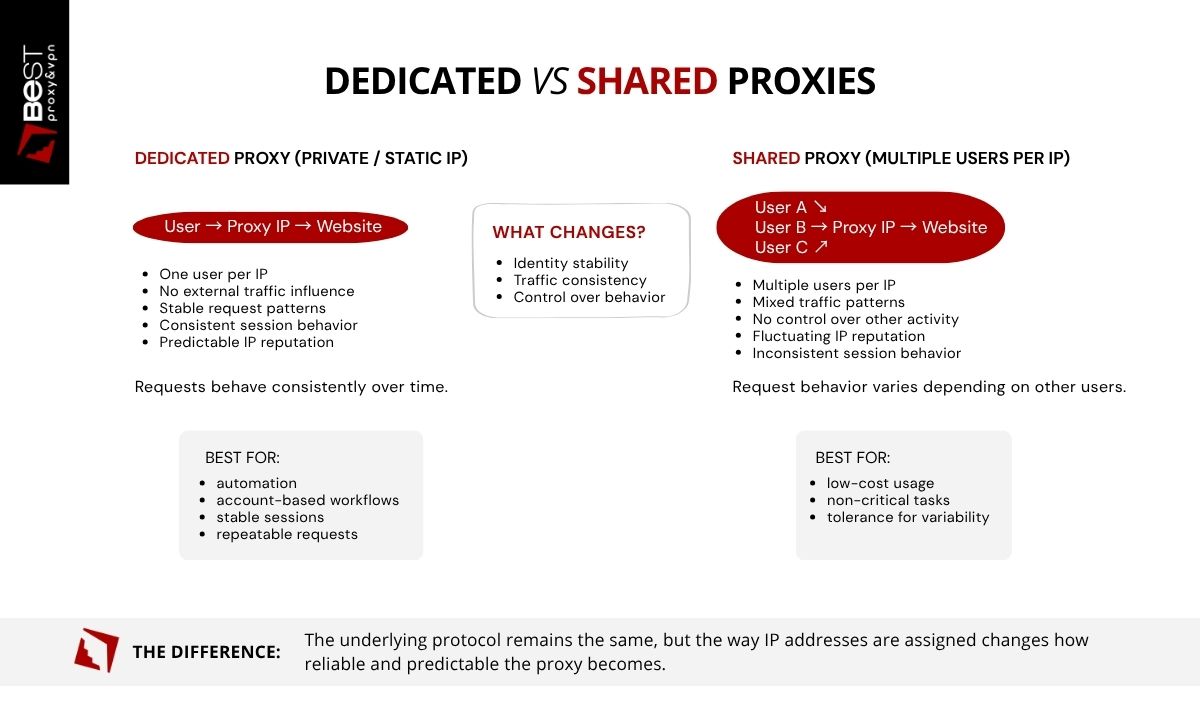
HTTP proxies can be allocated in two primary ways: shared or dedicated. The underlying protocol remains the same, but the way IP addresses are assigned changes how reliable and predictable the proxy becomes. This distinction is critical in workflows where request behavior and IP reputation directly affect outcomes.
Dedicated HTTP Proxies
A dedicated HTTP proxy, also referred to as a private or static proxy, assigns a single IP address to one user. That IP is not shared with other customers. This means all activity associated with the proxy is controlled by a single operator. Request patterns, session behavior, and IP reputation remain consistent over time.
Because the IP does not change and is not influenced by external traffic, dedicated proxies provide:
- Stable IP identity across sessions
- Predictable request behavior
- Consistent performance over time
- Full control over how the IP is used
This makes them suitable for environments where variability introduces risk, such as:
- Automation systems that rely on repeatable requests
- Account-based workflows requiring session persistence
- Applications sensitive to rate limits or detection systems
In these cases, a static dedicated proxy is not a convenience. It is a requirement for maintaining stability.
Shared HTTP Proxies
A shared HTTP proxy assigns the same IP address to multiple users at the same time. This means the behavior associated with that IP is influenced by unrelated activity. Request volume, patterns, and destinations can vary depending on how other users are utilizing the proxy.
This introduces variables that cannot be controlled directly, including:
- Inconsistent response behavior
- Sudden rate limiting or blocking
- Unstable session handling
- Fluctuating IP reputation
Shared proxies are typically used when cost is the primary constraint and the workload does not depend on consistent identity or predictable performance.
Which Should You Choose?
The decision between shared and dedicated proxies is not about features, it is about tolerance for variability.
- If the workflow depends on stable IP identity, consistent sessions, and predictable outcomes, a dedicated proxy is required
- If the task can tolerate interruptions, inconsistent behavior, or changing IP reputation, a shared proxy may be sufficient
In practice, most failures in proxy-based workflows are not caused by the protocol itself, but by instability in the underlying IP allocation. That instability is inherent to shared infrastructure.
Residential vs Datacenter HTTP Proxies
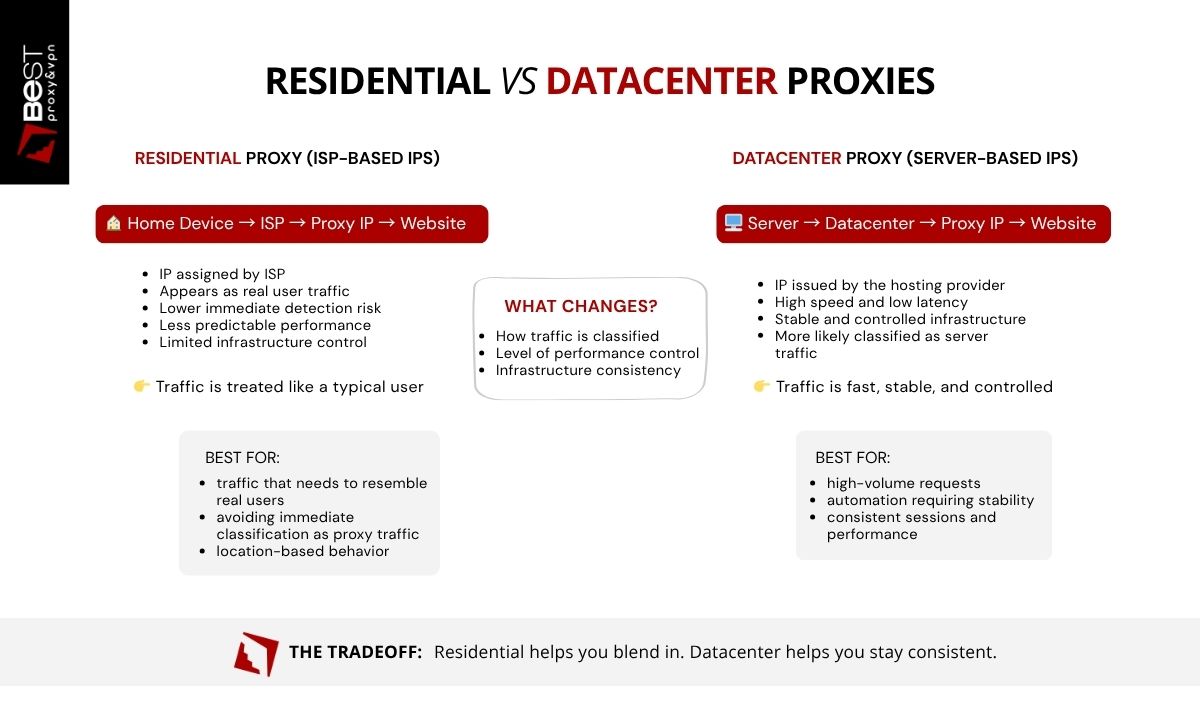
HTTP proxies can operate on different types of IP infrastructure, most commonly residential or datacenter IP addresses. The protocol remains the same, but the origin of the IP address affects how requests are classified and handled by destination websites. This distinction influences detection risk, performance, and cost.
Residential HTTP Proxies
A residential HTTP proxy uses an IP address assigned by an internet service provider (ISP) to a residential device. From the perspective of websites, the request appears to originate from a normal household internet connection. Because these IP addresses resemble typical user traffic, residential proxies are often less likely to be immediately classified as proxy infrastructure.
Residential HTTP proxies are commonly used for:
- Large-scale web data collection
- Location-based testing
- Market research
- Applications that interact with public websites
However, residential proxies typically come with higher costs and may have less predictable performance compared to datacenter infrastructure. Residential IPs are effective when classification matters more than speed, but they introduce variability that can affect reliability.
Datacenter HTTP Proxies
Datacenter proxies use IP addresses issued by hosting providers and cloud infrastructure. These IPs are designed for performance. They offer high bandwidth, low latency, stable infrastructure, and uptime.
Common uses include:
- High-speed automation workflows
- Application testing
- Routing large volumes of web requests
- Development environments
However, because these IP ranges are associated with server environments, websites are more likely to classify them as non-residential traffic. This can increase the likelihood of filtering or rate limiting in some contexts.
Which Should You Choose?
The choice between these proxy types depends on the requirements of the application. Residential proxies may be useful when traffic needs to resemble typical consumer internet activity, while datacenter proxies are often preferred for performance, scalability, and cost efficiency.
How to Set Up an HTTP Proxy (Step-by-Step)
Configuring an HTTP proxy usually involves entering the proxy server’s connection details into the application or browser that will route its web traffic through the proxy. Because an HTTP proxy server operates at the application layer, it is often configured within individual programs rather than at the entire operating system level.
While the exact interface may vary depending on the software being used, the general process for setting up an HTTP proxy follows the same steps.
Step 1 — Obtain HTTP Proxy Credentials
Before configuring the connection, you need the details provided by the proxy service. These typically include:
- proxy server IP address
- port number
- username and password (if authentication is required)
These credentials allow your application to establish a connection with the HTTP proxy server.
Step 2 — Open Network or Proxy Settings
Most browsers and applications include a section where proxy connections can be configured. This may appear under settings such as:
- network settings
- connection settings
- proxy configuration
- advanced network options
Within this section, you can specify that the application should route its web requests through an HTTP proxy.
Step 3 — Select HTTP Proxy Configuration
When configuring the connection type, select HTTP proxy and enter the proxy server details provided by your proxy service. You will typically need to specify:
- proxy host or IP address
- proxy port
- authentication credentials (if required)
Once these values are entered, the application will send web requests through the HTTP proxy server rather than connecting directly to the destination website.
Step 4 — Save and Apply Settings
After saving the configuration, the application will begin routing web traffic through the proxy. At this stage, the HTTP proxy protocol handles the communication between the client application, the proxy server, and the destination web server.
Step 5 — Verify the Connection
To confirm that the proxy is working correctly, you can check the visible IP address using an IP-checking service. If the configuration is correct, the detected IP address should match the proxy server rather than your original network address.
Remember that HTTP proxies operate at the application level, so only the programs configured with the proxy settings will use the proxy connection. Other programs on the system will continue to use the default network connection unless configured separately.
FAQ
When should you use an HTTP proxy instead of a SOCKS proxy?
Use an HTTP proxy when you need to control or manage web requests, such as modifying headers or maintaining consistent request behavior. Use a SOCKS proxy when routing non-HTTP traffic or when protocol flexibility is required.
When should you use a dedicated proxy instead of a shared proxy?
A dedicated proxy should be used when stability, consistent IP identity, and predictable behavior are required. Shared proxies introduce variability because multiple users affect the same IP.
Are HTTP proxies good for web scraping or automation?
Yes, when the request behavior needs to be controlled or distributed. However, the effectiveness depends on the stability and reputation of the proxy. Unstable or shared proxies often lead to inconsistent results.
What is the difference between residential and datacenter proxies?
Residential proxies use IPs from real devices, making traffic appear like normal users. Datacenter proxies use server-based IPs, offering better performance and stability but a higher likelihood of being identified as non-residential traffic.
Which is better: residential or datacenter proxies?
Residential proxies are better when classification as user traffic is required. Datacenter proxies are better when performance, control, and cost efficiency are the priority.
Do HTTP proxies work with HTTPS?
Yes. HTTP proxies can route HTTPS traffic. While the proxy can see connection metadata, the content remains encrypted between the client and the destination server.
How do you choose the right HTTP proxy?
The choice depends on the workflow. If consistent identity and predictable behavior are required, dedicated datacenter proxies are typically the most reliable option. If traffic needs to resemble residential users, residential proxies may be more appropriate despite higher cost and variability.